Sunday, June 30, 2019

Writing a Biography


Now that you have a Family Search account and are a little more familiar with the platform we can start learning and discovering our relatives and finding out more about who they were.

The best way I have found to both learn and teach family history is to try writing a biography of one of your ancestors. This helps you know what to search for and keeps you on track if needed. I've created a Family Biography Outline that you can use in both a Word Document and as a PDF. Just a quick reminder, make sure you write down your sources (I forgot to put this on my outline).

When choosing a person to write a biography about I would recommend choosing somebody who was born around 1830 or younger. The reason behind this is because you will find the records and sources start having more information in them and they will give you better leads for your research.

First, log in to Family Search and find a family member you would like to research or learn more about. To do this go to the Tree tab in the upper left-hand corner. If you look at the screenshot you'll see what it looks like. Number 1 is how you can zoom in or out. Pushing the arrow at 2 will expand your tree. I prefer looking at the Fan Chart. To do this click on 3 and select Fan Chart.

I like the fan chart because it shows you more generations at once so you can choose the ancestor you want to research a little easier. You can choose how many generations back you can see at once by clicking on one of the numbers on the right of Generations. It also shows you their birth and death dates (if there's room).

Go ahead and look through the names, click on their names and information, look to see who has sources and who doesn't. If somebody doesn't have many sources attached they might be good ones to research.

Once you've chosen somebody to write a biography on, print out the outline and start filling it out. If you can't find some of the information that's ok. We'll learn how to research and read sources later.

Sunday, June 9, 2019

Becoming Familiar With Family Search

Once you've logged in to family search from your computer you'll see the Family Search homepage. This page provides you with record hints, a todo list for you to create, memories of family members that have recently been uploaded to the database, and a list of ancestors you've recently looked at.
Family Search User Homepage
Let's look at the record hints also known as the recommended tasks (much like the leaves in Ancestry). If you see a blue card next to a name, these are possible sources for you to attach to your tree. These sources could include birth records, census records, and death records. 

OK, so I'm going to go off on a little tangent. Sources are EXTREMELY IMPORTANT. They hold the key to proving certain things such as date of birth, date of death, and marriage dates. For example, one of my ancestor's names was Bertinius Bendixson. Some thought he died as a baby and others thought he lived a full life. Everybody kept changing his information or merging him if two people with the same name were created. After going through this a lot we hit a goldmine with sources. There were two children named Bertinius. One died as a baby and the other who was born a year or two later was given the same name and lived a good life. This is why attaching those sources is so important and valuable. 
Getting back on track, looking at these sources can tell you a lot about your ancestors and can lead you to new discoveries and new family. Here's my recommendation, if you're just getting started or it's been a while since you've been on Family Search, look at the recommended tasks. It will help you get a feel of what you can find and things you may want to search for when looking for those ancestors.

You can also do this from any mobile device. Once you've downloaded the FamilyTree app and after you logged in you'll see your tree. You can access the recommended tasks by clicking on the three lines at the top left of the screen then clicking on Ancestors with Tasks on an Android device or clicking on tasks at the bottom of your iDevices (iPad, iPhone...). 

Sunday, March 24, 2019

Getting Started With Family Search

Creating a Family History Account

If you're interested in family history, one of the best resources to start with is familysearch.org. This is the resource I use the most when I research or when I want to find information and stories about my ancestors. This resource is completely free to everyone. You don't have to be a member of the Church Of Jesus Christ Of Latter-Day Saints to use it.

This short video walks you through setting up an account with Family Search using the Family Tree app.


Family Tree App

5 Steps to Setting Up A Family Search Account. 

  1. Download the Family Tree app or go to familysearch.org
  2. Click "Create Free Account"
  3. Add in your personal information: Name, birthdate, gender...
  4. Create a username and password
  5. Complete your registration by verifying the email address you supplied. 


Once you've signed up you can log in and start adding your family! 

For more information on family history subscribe to my YouTube channel or visit me on Facebook and Instagram!

Wednesday, June 27, 2018

Family History: It’s More Than Just Names, Dates, and Places

What do you do if you don’t like doing research, but you want to participate in family history? This is a common question. Family history is more than just dates and places. It’s about learning who you are and where you come from. It’s about learning from your ancestors’ experiences and knowing who they are.

View of FamilySearch.org Stories Tab
x
So, how do you learn without all the research? Many online family history programs have a place for people to upload stories, write memories, or post pictures. Familysearch.org allows this information to be seen by everybody if the person is deceased. On Ancestry.com the 
View of FindAGrave.com
the person that posted the information can choose if they want the information to be public or private. FindAGrave.com may also have a bio or life sketch on the deceased person. My point is that the information is there, all you need to do is go to your preferred family history website, type in the name of your ancestor and hopefully, (if somebody else has done the research and written or posted a story) start learning.

I would suggest starting small. Some of the bios and life histories can be long and tedious to read. Cut them down into sections. Instead of reading a five to ten-page history, read the first story, start with one paragraph or maybe two and then be done for a while (unless you want to keep reading). You don’t usually eat a pizza in one big bite, you usually eat one slice at a time, one bite at a time. 

Tuesday, May 15, 2018

Family History Research Overview

There are two ways you can research your ancestors, there's manual and there's digital. We need to understand and learn both. I usually do digital research, it's what I'm comfortable with and it can yield quick results. However, not everything is online or in a digital format. If that's the case you need to know where to physically look for what you want.


The Manual Search

Marilyn Kelly Fieldings Apron
Marilyn Kelly Fielding's Apron
 Searching manually can be difficult and can take a lot of time but it can also be fun. I love looking through those items that have been passed down from my ancestors and finding out the stories behind those items. Why were they passed down? Why were they special? Who did they originally belong to? For example, when my grandmother passed away I was lucky enough to get her aprons. Whenever we went to her home she was always cooking and she always wore them. This is something I will pass to my girls.
I also love the feeling of finally finding something you've searched a long time for. The work you put in when researching manually is worth it and in my opinion, can be more rewarding than finding something on the computer.

If you search manually, I recommend:

  1.  Search for what you can get easily and through things you may already have such as journals or photo albums.
  2. Talk to living relatives. Find out if they have any information such as birthdates, marriage dates, or places they lived
  3. Obituaries and other news articles. 
  4. Church records to find birth and baptism records, marriage record, and death information.
  5. Government records to find official land information, wars they may have served in, and birth, marriage, and death certificates.


The Digital Search

The digital search can be easier and faster but comes with difficulties of its own. The biggest issue I have found with a digital search is knowing what is true and what is not. You need to keep in mind that anybody and everybody can put something online so I recommend keeping to sites you know and trust. Family blogs or informational websites can hold valuable information as to dates, places, and stories but if they don't have credible sources listed take the information and research it yourself. These types of websites can give you a great starting point but you may not want to take it at face value.

For a digital search, I recommend starting with these (not in any particular order):

  • Ancestry.com
  • FindAGrave.com
  • BillionGraves.com
  • FamilySearch.org
  • FindMyPast.com
  • MyHeritage.com
  • Search engines
When you use a search engine you need to be careful. This is what I was referring to above but it can still give you fun information. For example, when I Google "Richard Nettle 1815" I find a link to a book called "The Salmon Fisheries of the St. Lawrence and Its Tributaries". It was written by one of my ancestors, Richard Nettle.
Google Search for Richard Nettle 1815You'll also notice in my screenshot links to other people that is not my ancestor. Just be careful and make sure you verify what you find with what you already know.


Wednesday, September 20, 2017

Setting Up

Getting Set Up

    Once you've chosen your preferred platform its time to start getting set up. ALWAYS start at the beginning or what you know the most about, which is usually yourself. Very few people, if any, know more about you than you so that's where you start. Put in your full name: first, middle, last. Now, for all of you ladies that are reading this, keep in mind here that you will put in your maiden name if you are married or ever were married. This connects you to your parents just like a man's last name connects him with his parents. Don't forget to include your birthday, where you were born... Anything about yourself. 
Screenshot of familysearch.org. Click on highlighted area to add information

    After you've taken care of yourself, start to add others in your family. You will want to include children, parents, siblings, aunts, uncles, cousins, any and all spouses even if you're divorced or a widow or widower, they were and are part of your life, include them. If you had children with multiple partners/spouses make sure those kids are under the right parent. All of this information, no matter how hard, difficult, or how good it is to remember, made you who you are. It tells a story, your story, and those that come after you will be grateful for any information they can learn about you.
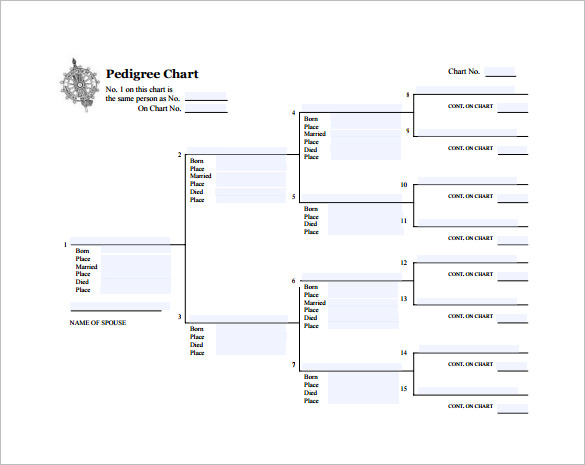
   Try to fill in your first four generations; you, you're parents, grandparents, and great-grandparents. You can also put in your spouse, mother and father-in-law, grandparents-in-laws, and great-grandparents-in-laws (is that a word?) If you don't have all the information and the person you're adding is living don't be afraid to ask them. I can't tell you how much I would love to ask both sets of my grandparents questions about themselves. Unfortunately I missed my chance. If you have the chance, take it! If they are no longer here to answer your questions then it's time to start researching.

*Remember to mark people as living if you don't know if they've passed away. Some programs will ask and if you mark them as deceased when they're not it could cause problems*

Sample Pedigree chart from template.net


Sunday, September 17, 2017

Where Do I Start?


The first thing you need to do is find a platform that you're comfortable with. There are the software programs that you download and install to your computer and the web-based programs that you use while connected to the internet. Many of your web-based programs also have an app that you can use on your phone or other devices so that it is more mobile. I have listed some of each down below.


Family History Software

Legacy Family Tree
Family Historian
Ancestral Quest
RootsMagic
Family Tree Heritage

Family History Web Programs

Ancestry.com
FamilySearch.org
MyHeritage.com
FindMyPast.com

Other Family History Websites

BillionGraves.com
FindAGrave.com